Smallpdf vs ILovePDF vs RCInsights: Which PDF Tool is Best in 2026?
Smallpdf and ILovePDF are the most popular PDF tools online — but both upload your files to servers, have daily limits, and add watermarks on free tier. Here's how RCInsights compares.

Ram
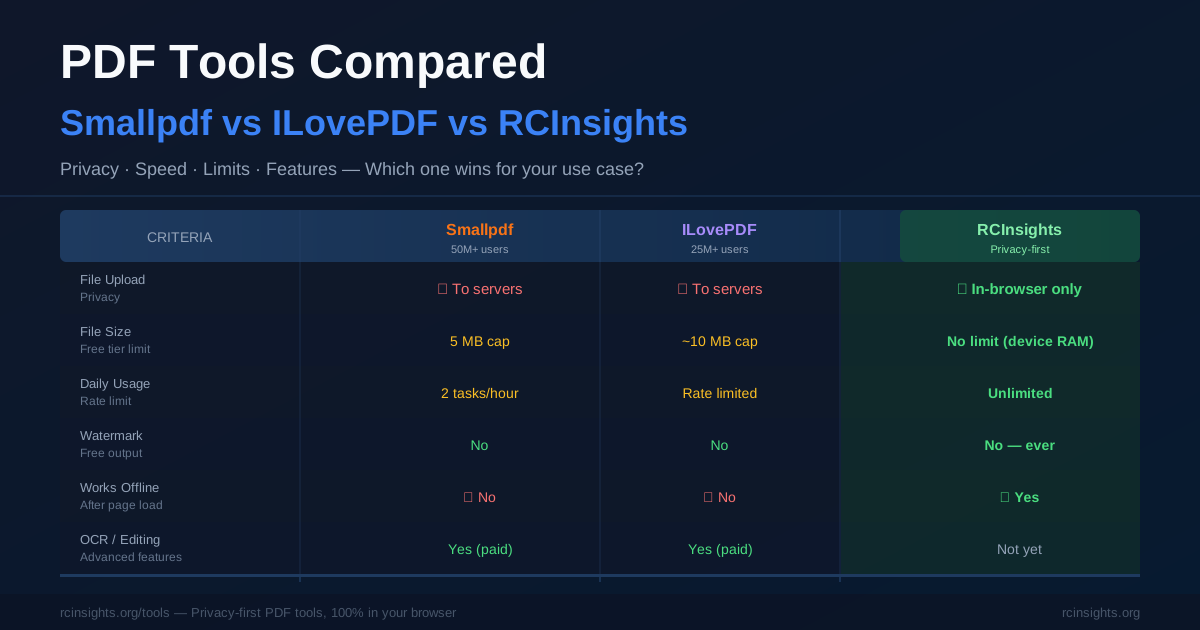
The two dominant free PDF tools online are Smallpdf (founded 2013, 50M+ monthly users) and ILovePDF (founded 2010, 25M+ monthly users). Both have strong feature sets, polished UIs, and millions of happy users.
But both share a fundamental characteristic that matters for privacy-conscious users: they upload your files to their servers.
This comparison looks at what you actually get from each tool and why the processing architecture difference matters.
Feature Comparison
| Feature | Smallpdf | ILovePDF | RCInsights |
|---|---|---|---|
| File upload to server | Yes | Yes | Never |
| Free tier daily limit | 2 tasks/hour | Limited | Unlimited |
| File size limit (free) | 5MB (then paid) | Limited | No limit |
| Watermark on free | No | No | No |
| Account required | No (basic) | No (basic) | No |
| OCR (text recognition) | Yes (paid) | Yes (paid) | No |
| PDF editing | Yes (paid) | Yes (paid) | No |
| Works offline | No | No | Yes |
| Privacy | Files uploaded | Files uploaded | In-browser |
| E-signature | Yes (paid) | Yes (paid) | No |
Smallpdf is the most polished PDF tool available online. Clean UI, reliable performance, excellent OCR, and strong integration with Google Drive and Dropbox. Their free tier is generous — most basic operations work without payment.
Free tier limitations:- Processing speed is throttled on free tier
- 2 conversions per hour for non-registered users
- Files over 5MB require a paid plan
ILovePDF: The Feature-Rich Alternative
ILovePDF offers more tool variety than Smallpdf — 25+ PDF operations including PDF compressor, watermarker, page number adder, and more. Slightly more complex UI but more comprehensive feature coverage.
Free tier limitations:- File size limits (varies by operation)
- Rate limiting on heavy usage
- Some features locked to premium
RCInsights PDF Tools: The Privacy-First Option
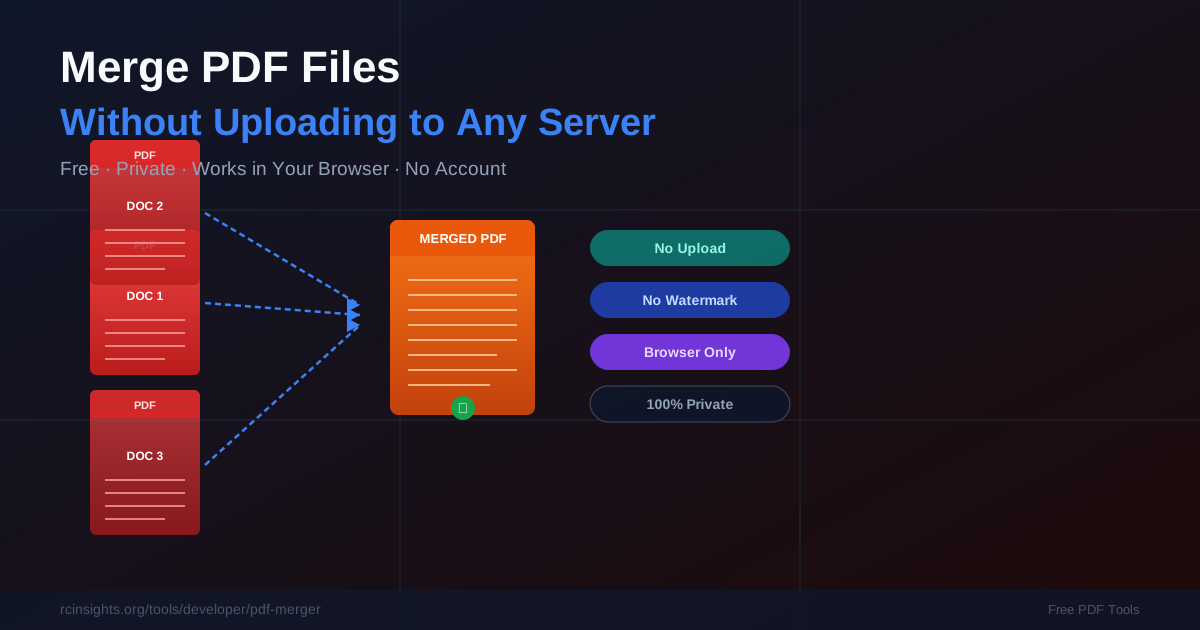
RCInsights PDF tools (Merger, Splitter, PDF to Image, Image to PDF) are fundamentally different from Smallpdf and ILovePDF in one way: your files never leave your browser.
What this means in practice:- No server can breach your documents because they're never on a server
- Works with internet off (after page loads)
- No rate limiting — merge 50 PDFs in sequence with no cooldown
- No file size limit beyond your device RAM
- No watermarks, ever, on any plan
- No OCR capability
- No PDF editing (text modification, annotation)
- No e-signature
- No cloud storage integration
The Privacy Argument: When It Actually Matters
For most use cases, server processing is completely fine. Smallpdf's security is legitimate and their processes are transparent.
But consider these scenarios:
Scenario 1: Home Loan Processing You're merging 12 months of bank statements for a home loan application. These statements contain your account number, salary, all transactions for a year, and your address. Do you want this on a US server? Scenario 2: Job Application in a Regulated Industry You're applying to a bank, law firm, or government position. Your application package contains passport scans, degree certificates, and background information. Scenario 3: Business Documents You're merging client contracts, pricing documents, or internal financial reports. These may contain confidential business information under NDAs.For casual documents — merging two public PDFs, splitting a magazine article — server processing is irrelevant. For sensitive personal or business documents, in-browser processing eliminates a category of risk entirely.
Performance Comparison
| Metric | Smallpdf | ILovePDF | RCInsights |
|---|---|---|---|
| 5MB file merge speed | 3-8 seconds | 3-6 seconds | 0.5-2 seconds |
| 50MB file merge speed | 15-30 seconds | 15-25 seconds | 2-5 seconds |
| Throttling | Yes (free) | Yes | No |
| Works in rural/poor connectivity | No | No | Yes (after page load) |
Feature Gap: What RCInsights Doesn't Have
To be honest about trade-offs:
- OCR (Optical Character Recognition): Smallpdf and ILovePDF can make scanned PDFs text-searchable. RCInsights does not currently offer OCR.
- PDF Text Editing: Neither Smallpdf's free tier nor ILovePDF's free tier offers true text editing. RCInsights also doesn't — but this levels the playing field on the free tier.
- E-signature: Both competitors offer e-signature workflows (paid). RCInsights does not.
- Cloud Storage Integration: Smallpdf integrates with Google Drive, Dropbox, OneDrive. RCInsights works with local files only.
The Verdict
| Use Case | Best Tool |
|---|---|
| Merging sensitive documents (bank statements, legal docs) | RCInsights |
| High-volume merging (50+ files/day) | RCInsights |
| OCR on scanned PDFs | Smallpdf |
| PDF editing and annotation | Smallpdf Pro |
| Quick casual merge, no privacy concerns | Any of the three |
| Works offline / poor connectivity | RCInsights |
| Budget: $0 per month | RCInsights |
| E-signature workflow | Smallpdf or ILovePDF |
Try our PDF tools at rcinsights.org/tools — no account, no upload, no limit.
Tips for Getting the Best Results from Each Tool
Smallpdf Tips
- Use the Smallpdf Desktop app if you process PDFs daily — it avoids the browser rate limits entirely and works faster
- Sign up for a free account to unlock slightly higher limits and access your recent file history
- Google Drive integration is genuinely useful: connect once, then access Drive files directly without downloading and re-uploading
- For OCR on scanned documents, Smallpdf's OCR is reliable for English text but variable for other languages
ILovePDF Tips
- Batch processing is ILovePDF's strongest feature — you can process many files at once, making it efficient for bulk operations
- The PDF compressor is particularly good: it reduces file size substantially with minimal visible quality loss, useful before email attachments
- Mobile app (iOS and Android) is well-reviewed for occasional use on the go
RCInsights PDF Tool Tips
- Add to browser bookmarks or open as a pinned tab for instant access during your workday
- For large merges (10+ files), add files incrementally rather than all at once — this gives you a chance to verify each file before committing to the merge
- Works offline after first load — save the URL before going on a flight or working in areas with poor connectivity; the page continues to function after the initial load
Security Deep Dive: What "No Upload" Actually Means
When Smallpdf or ILovePDF process your file, this is what happens:
- Your file is transmitted via HTTPS to their servers in Europe/US
- A server process reads the PDF, performs the operation, and writes a new file
- The result is made available for download for 1-5 hours
- The file is deleted from their servers (as per their privacy policy)
- The file is loaded into your browser's memory (RAM) — never transmitted anywhere
- PDF-lib (a JavaScript library) manipulates the file data in memory
- The result is written to a temporary blob URL in your browser
- Your browser downloads it — identical to downloading any local file
Frequently Asked Questions
Can Smallpdf or ILovePDF see the content of my documents? Technically yes — their servers process the files. Both companies state they don't read or use document content and have privacy policies that restrict staff access. However, the data does pass through and temporarily reside on their infrastructure. RCInsights data never leaves your device. Which tool handles the largest PDF files? RCInsights, for a simple reason: your local hardware (16GB+ RAM on modern laptops) can handle much larger files than what free server tiers allow. Smallpdf and ILovePDF cap free uploads at 5-25MB depending on the operation. Browser-based processing only faces your device's RAM as a practical limit. Is ILovePDF GDPR compliant? ILovePDF is a Spanish company and subject to GDPR. They process files under a data processing agreement and claim compliance. RCInsights avoids this question entirely — there is no personal data transmitted, so GDPR obligations around data processing don't arise for the PDF operations. What's the best free option for occasional personal use with no privacy concerns? All three work fine for casual use. Smallpdf has the cleanest UI; ILovePDF has the widest feature set; RCInsights has no limits and no account requirements. Choose based on whether you need OCR/editing (Smallpdf), bulk operations (ILovePDF), or unlimited privacy-first use (RCInsights).Which Tool for Which Use Case (Decision Matrix)
Rather than a single "winner," the right tool depends on exactly what you need to accomplish. Here is a concrete decision guide.
Use RCInsights When:
- The document is sensitive. Bank statements, ITR documents, salary slips, legal agreements, medical records, passport scans — anything you would not email to a stranger. Browser-only processing means the data never exists on any server.
- You are merging or splitting frequently. No rate limits means you can run 50 operations back to back without cooldowns or hitting a paywall.
- You are offline or on poor connectivity. After the page loads once, RCInsights tools work with no internet. In flight, in a rural area, or on a throttled connection, other tools simply do not function.
- File size exceeds free tier limits. Merging a 150MB PDF on Smallpdf free tier fails. Browser-based processing handles it, bounded only by your device RAM.
- You need zero account friction. No sign-up, no email confirmation, no onboarding flow.
Use Smallpdf When:
- You need OCR. Converting a scanned document into searchable text requires OCR, and Smallpdf's OCR is among the best for English and European languages.
- You need PDF editing. Adding, deleting, or modifying text inside an existing PDF requires true editing capability — Smallpdf Pro provides this.
- You need e-signatures. Smallpdf has a well-integrated signature workflow that lets recipients sign PDFs digitally and return them.
- Google Drive or Dropbox integration matters. If your workflow revolves around cloud storage, Smallpdf's integrations save significant time.
- You want a polished desktop app. The Smallpdf Desktop application is well-built and avoids browser limitations entirely.
Use ILovePDF When:
- You need bulk batch processing. ILovePDF's batch mode lets you process many files in a single operation — useful for compressing 30 PDFs at once, for example.
- You need advanced PDF operations like adding page numbers, watermarks, or custom headers across many files.
- PDF compression is the primary need. ILovePDF's compressor is particularly effective at reducing file size, useful before emailing large documents.
- You want a mobile app. ILovePDF's iOS and Android apps are well-reviewed for on-the-go PDF operations.
Privacy Policy Deep Dive
All three tools have privacy policies, but what those policies actually mean in practice differs significantly.
Smallpdf Privacy Policy (Key Points)
Smallpdf is a Swiss company, subject to Switzerland's Federal Act on Data Protection (FADP), which is broadly aligned with GDPR. Their policy states:
- Files are automatically deleted within 1 hour for non-registered users
- Files may be processed on servers operated by AWS (Amazon Web Services) in the EU
- Smallpdf staff do not manually access document content
- Files are encrypted in transit (HTTPS) and at rest (AES-256)
- If you opt into Smallpdf's AI features, your documents may be used to improve those features — check that this is off if you have concerns
ILovePDF Privacy Policy (Key Points)
ILovePDF is headquartered in Barcelona, Spain, making it subject to GDPR (EU General Data Protection Regulation) — one of the strictest data protection frameworks globally.
- Files are deleted after 2 hours of processing
- Data is processed on EU-based servers
- GDPR data subject rights apply: you can request deletion, access, or correction of any data
- The company does not sell document data to third parties
RCInsights: No Privacy Policy Needed for Processing
The unique position of browser-based processing is that there is nothing to policy about. When a file never leaves your device, no privacy policy clause about retention or access applies — there is no data to retain or access.
The only data RCInsights collects is standard web analytics (page views, which country users are from) — the same data any website with analytics collects. Your document content is never transmitted and never logged.
This is a categorical difference, not a matter of trust or policy quality. Even the most airtight privacy policy requires trusting a company's adherence to it. Browser-only processing requires no such trust.
Free Tier Limits: What You Can Actually Do
Free tier marketing can be misleading. Here is exactly what each tool lets you do without paying, based on current policy.
Smallpdf Free Tier (as of 2026)
- 2 tasks per hour for non-logged-in users
- 1 task per day for logged-in free users on some operations (limits vary by operation type)
- 5 MB file size cap on free tier
- Processing speed is reduced ("throttled") compared to paid tier — expect 30-60 seconds for operations that take 5 seconds on paid tier
- Some features (PDF editing, OCR, e-signature) are paid-only regardless of usage limits
- Bottom line: Smallpdf free tier is fine for 1-2 quick personal tasks. Anything more frequent or over 5MB hits a wall.
ILovePDF Free Tier (as of 2026)
- No hard daily task limit, but rate limiting applies to heavy use
- File size limits vary by tool: typically 10-25 MB for merging/splitting, smaller for conversion operations
- Some tools available free without limit; others require a Premium account after a trial
- Compression and merge tools are generally accessible for free
- Bottom line: ILovePDF's free tier is more generous than Smallpdf's on task count but still imposes file size limits that affect real-world use (large PDFs fail).
RCInsights Free Tier (as of 2026)
- No task limit — run 1,000 operations in a day if you want
- No file size limit — limited only by device RAM (typically 8–16 GB on a modern laptop)
- No time limit — no cooldown between tasks
- No account required — ever
- All features (Merger, Splitter, PDF to Image, Image to PDF) are free with no premium tier
- Bottom line: Everything that exists on the platform is fully free, with limits set only by your hardware. The trade-off is no OCR, no editing, no e-signature.