·12 min read

Base64 Encoding Explained: When and Why Developers Use It

Base64 appears in JWT tokens, API calls, image embedding, and email attachments. Here's how it works, why it exists, and exactly when you should use it as a developer.

Ram profile

Ram

Base64 encoding explained with developer examples
Share

Base64 encoding appears across nearly every layer of modern software development: in JWT headers, API authentication, image CSS embedding, email attachments, and more. Yet most developers use it without understanding why it exists or when not to use it.

Encode or decode Base64 instantly with our free Base64 Encoder/Decoder — no data uploaded, everything in your browser.

Why Does Base64 Exist?

The root cause: many communication systems were designed for 7-bit ASCII text (US English characters only). Binary data — images, audio files, compiled code — contains bytes with values 0-255, many of which are "control characters" that older systems interpret as commands (newline, carriage return, null byte, etc.) rather than data.

Base64 was invented to safely transmit binary data over these text-only channels by representing all binary data using only 64 printable ASCII characters.

The 64 characters are: A-Z (26), a-z (26), 0-9 (10), + (1), / (1) = 64 total. Every byte of any binary data can be represented using only these safe characters.

How Base64 Works (The Math)

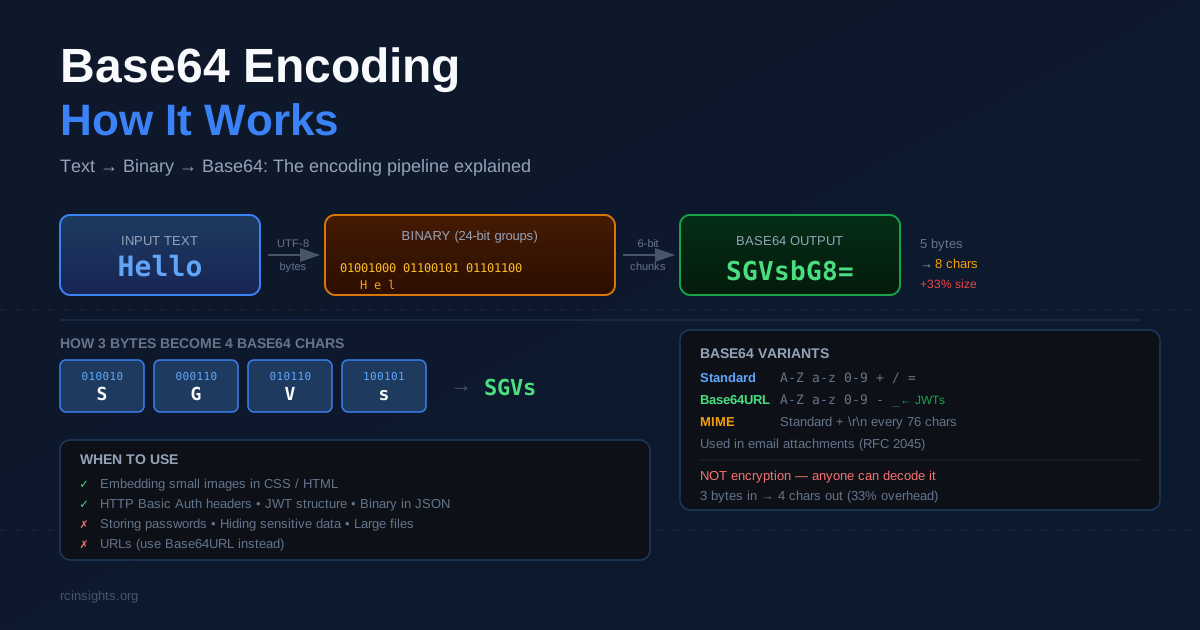
Base64 takes 3 bytes of binary input (24 bits) and converts them to 4 printable ASCII characters.

The process:
  1. Take 3 bytes: M, a, n = binary 01001101 01100001 01101110
  2. Group into 4 × 6-bit chunks: 010011 010110 000101 101110
  3. Convert each 6-bit value to its Base64 character: T W F u
  4. Result: TWFu
Verify: paste TWFu into our Base64 Decoder and get back Man. The size overhead: 3 bytes become 4 characters — a 33% size increase. This is the tradeoff Base64 makes for universal compatibility. Padding (=): If input length isn't divisible by 3, = characters pad the output to a multiple of 4.
  • 1 remaining byte → 2 Base64 chars + ==
  • 2 remaining bytes → 3 Base64 chars + =

When to Use Base64

1. Embedding Images in HTML and CSS

Without Base64, an image requires a separate HTTP request:

<img src="/images/logo.png">

With Base64, embed the image directly (no extra request):

<img src="data:image/png;base64,iVBORw0KGgoAAAANSUhEUgAA...">

When it makes sense: Small icons (under 1KB) where the HTTP request overhead exceeds the size increase from Base64. For images over 10KB, separate files are faster due to HTTP/2 multiplexing and browser caching.

2. HTTP Basic Authentication

HTTP Basic Auth transmits credentials as Base64 in the Authorization header:

Authorization: Basic cmFtOm15cGFzc3dvcmQ=

Decode cmFtOm15cGFzc3dvcmQ= with our decoder and you get ram:mypassword. This is why Basic Auth requires HTTPS — Base64 is encoding, not encryption. Anyone who intercepts the header can trivially decode the credentials.

3. JWT Token Structure

JWT tokens use Base64URL (a URL-safe variant) for the header and payload:

eyJhbGciOiJIUzI1NiJ9.eyJzdWIiOiIxMjM0In0.SIGNATURE

Decode the first part: {"alg":"HS256"} (header) Decode the second part: {"sub":"1234"} (payload)

Base64URL differs from standard Base64 by replacing + with - and / with _, making it safe for URLs without encoding. Use our JWT Decoder for JWT-specific decoding with structured output.

4. Sending Binary Data in JSON APIs

JSON only supports text. When an API needs to return binary data — a PDF file, an image, an audio clip — Base64 is the standard way to embed it:

{
  "filename": "invoice.pdf",
  "content": "JVBERi0xLjQKJcOkw7z...",
  "encoding": "base64"
}

The client decodes the content field to get the original PDF bytes.

5. Email Attachments (MIME)

SMTP (email protocol) is text-only. Email clients encode file attachments in Base64 before transmission using MIME (Multipurpose Internet Mail Extensions):

Content-Type: application/pdf; name="report.pdf"
Content-Transfer-Encoding: base64

JVBERi0xLjQKJcOkw7zDpMO8...

This is handled transparently by email clients. Understanding it matters when debugging MIME messages or building email sending functionality.

When NOT to Use Base64

Don't Use It as Encryption

Base64 is encoding, not encryption. It is completely reversible without any key — anyone can decode it. Using Base64 to "hide" sensitive data provides zero security and creates a false sense of security.

// BAD: This hides nothing
const "encrypted" = btoa("password123");
// -> "cGFzc3dvcmQxMjM="
// Anyone can decode: atob("cGFzc3dvcmQxMjM=") -> "password123"

For actual encryption, use AES-GCM (symmetric) or RSA/ECDSA (asymmetric) with a proper cryptographic library.

Don't Use It for Large Files

The 33% size overhead matters at scale. A 10MB image becomes 13.3MB as Base64. For large files:

  • Use direct binary transfer (multipart/form-data for uploads)
  • Use object storage URLs (S3, GCS) rather than embedding content
  • Use streaming when possible

Don't Use It in URLs Unless Using Base64URL

Standard Base64 uses + and / which have special meaning in URLs. Always use Base64URL (replacing +- and /_) for URL parameters, or percent-encode the standard Base64 string.

Base64 in JavaScript

// Encode (browser)
btoa("Hello, World!"); // "SGVsbG8sIFdvcmxkIQ=="

// Decode (browser) atob("SGVsbG8sIFdvcmxkIQ=="); // "Hello, World!"

// Note: btoa/atob only work reliably with ASCII. // For Unicode strings: btoa(unescape(encodeURIComponent("नमस्ते"))); // Encode decodeURIComponent(escape(atob(encoded))); // Decode

Base64 in Node.js

// Encode
Buffer.from("Hello, World!").toString("base64");
// "SGVsbG8sIFdvcmxkIQ=="

// Decode Buffer.from("SGVsbG8sIFdvcmxkIQ==", "base64").toString("utf8"); // "Hello, World!"

// Base64URL Buffer.from("Hello!").toString("base64url"); // Uses - and _ instead of + and /

Base64 in Python

import base64

Encode

encoded = base64.b64encode(b"Hello, World!")

b'SGVsbG8sIFdvcmxkIQ=='

Decode

decoded = base64.b64decode(b"SGVsbG8sIFdvcmxkIQ==")

b'Hello, World!'

URL-safe Base64

encoded_url = base64.urlsafe_b64encode(b"Hello!")

Quick Reference

ScenarioUse Base64?
Small icon in CSSYes (< 1KB)
Large imageNo — use separate file
HTTP Basic AuthYes (protocol requirement)
JWT payloadYes (Base64URL — automatic)
Storing a passwordNo — use bcrypt/Argon2
Binary in JSON APIYes
URL parameterBase64URL only
Use our Base64 Encoder/Decoder for quick encoding and decoding in the browser — UTF-8 supported, nothing transmitted to any server.

Base64 Variants You'll Encounter

Standard Base64 isn't the only variant. Knowing which one to use prevents subtle bugs.

Base64URL

Used in JWTs, PKCE codes, and URL parameters. Replaces +- and /_, and omits = padding. Safe for use in URLs without percent-encoding.
// Node.js
Buffer.from(data).toString('base64url');

// Browser — manual conversion const base64 = btoa(data); const base64url = base64.replace(/\+/g, '-').replace(/\//g, '_').replace(/=+$/, '');

MIME Base64

Used in email attachments. Identical character set to standard Base64 but adds \r\n line breaks every 76 characters, as required by RFC 2045.

Base64 Without Padding

Some implementations omit trailing = padding. This is valid but breaks some decoders. Always pad to a multiple of 4 before decoding if you're unsure.

Modified Base64 for Filenames

Replaces / with _ to avoid path separator conflicts. Used in some legacy systems and certain database encodings.

Performance Considerations

Base64 encoding is fast but has measurable overhead at scale:

  • CPU: Trivial for small data; can become a bottleneck for megabytes of data in tight loops
  • Memory: Encoded output is 33% larger than input — allocate accordingly
  • Bandwidth: Always compress Base64 data before transmission if possible. Base64-encoded text compresses well (gzip reduces the overhead significantly) because the character set is limited and repetitive
Rule of thumb for API design: Don't Base64-encode large binary payloads in JSON APIs if you control both ends. Use multipart/form-data or direct binary uploads with Content-Type: application/octet-stream instead. Reserve Base64 for cases where you don't control the transport layer or protocol.

Base64 in Security Contexts

Base64 appears frequently in security-related headers and tokens. Key points:

Authorization headers: HTTP Basic Auth sends Authorization: Basic base64(username:password). This is only safe over HTTPS — anyone intercepting the raw HTTP request can trivially decode the credentials. Bearer tokens: JWTs use Base64URL for header and payload. The signature section protects integrity, but the payload is readable to anyone — don't put sensitive data in JWT payloads without additional encryption. API keys: Some systems Base64-encode API keys before transmitting. Again, this is encoding, not encryption — treat Base64-encoded credentials with the same security as plaintext credentials.

Frequently Asked Questions

Is Base64 the same as encryption? No. Base64 is completely reversible without any key. It is designed for data transport compatibility, not security. Anyone who sees a Base64 string can decode it instantly. For actual encryption, use AES, RSA, or a high-level library like Web Crypto API. Why do JWT tokens end with == sometimes? JWT tokens use Base64URL without padding by convention. If you see ==, you may be looking at standard Base64 rather than JWT. Actual JWT tokens have the format xxxxx.yyyyy.zzzzz with three dot-separated segments. How do I decode a Base64 image to view it? A Base64 image string typically starts with data:image/png;base64, or data:image/jpeg;base64,. Paste the full string (including the data: prefix) into your browser's address bar to view the image directly. Or use our Base64 decoder and paste the part after the comma. What is the difference between encoding and hashing? Encoding (Base64) is reversible — decode it to get the original data. Hashing (SHA-256, bcrypt) is one-way — you cannot recover the original input from the hash. Use encoding for data transport; use hashing for passwords and integrity verification. How can I tell if a string is Base64 encoded? Base64 strings only contain characters from A-Z, a-z, 0-9, +, /, and = (padding). Length is always a multiple of 4. However, many strings that look like valid Base64 are not intentionally encoded — always apply context before attempting to decode an unknown string.

Common Base64 Mistakes Developers Make

Understanding when not to use Base64 is just as important as knowing how it works.

Mistake 1: Treating Base64 as Security

This is the most dangerous mistake. Base64 encoding is completely and instantly reversible without any key. It was never designed for security — it was designed for safe text transport of binary data.

// This provides ZERO security
const "protected" = btoa(JSON.stringify({ userId: 1, role: "admin" }));
// eyJ1c2VySWQiOjEsInJvbGUiOiJhZG1pbiJ9

// Anyone can reverse it in one line JSON.parse(atob("eyJ1c2VySWQiOjEsInJvbGUiOiJhZG1pbiJ9")); // { userId: 1, role: "admin" }

If you see server-side code accepting Base64-encoded parameters and using them for authorization decisions without signature verification, that's a critical security vulnerability. Use signed tokens (JWT) or encrypted values instead.

Mistake 2: Using Standard Base64 in URLs

Standard Base64 uses + and / which are reserved characters in URLs. Sending a standard Base64 string in a URL parameter without encoding it causes the + to be interpreted as a space and / to be interpreted as a path separator.

// BROKEN: URL breaks at the + and / characters
const url = https://api.example.com/resource?token=${btoa(data)};

// CORRECT option 1: use Base64URL const base64url = btoa(data) .replace(/\+/g, '-') .replace(/\//g, '_') .replace(/=+$/, ''); const url = https://api.example.com/resource?token=${base64url};

// CORRECT option 2: percent-encode it const url = https://api.example.com/resource?token=${encodeURIComponent(btoa(data))};

In Node.js 18+, Buffer.from(data).toString('base64url') does this conversion automatically.

Mistake 3: Encoding Large Binary Payloads in APIs

If your API returns large binary files (PDFs, images, audio) as Base64 in JSON responses, you're adding 33% overhead to every response and forcing the client to decode everything before it can use any of it.

Better alternatives:
  • Return a URL pointing to the binary file in object storage (S3, GCS, Azure Blob)
  • Use multipart/mixed responses for mixed binary + JSON data
  • Use Content-Type: application/octet-stream for pure binary endpoints
When Base64 in JSON is acceptable: When the binary payload is small (under ~50KB) and the protocol already mandates JSON (like some messaging APIs or webhook payloads where you can't control the transport layer).

Mistake 4: Double-Encoding

If you're encoding data that's already Base64-encoded, you'll get double-encoded output:

const original = "Hello";
const encoded = btoa(original); // "SGVsbG8="
const doubleEncoded = btoa(encoded); // "U0dWc2JHOD0=" — wrong!

This often happens when encoding happens in two separate layers (middleware + application code). Always check whether the data is already encoded before encoding it again.

Mistake 5: Using btoa() Directly with Unicode Strings

The browser's built-in btoa() only handles characters in the Latin-1 range (0-255). Pass it a string containing emoji or non-Latin Unicode and it throws a DOMException:

btoa("नमस्ते"); // Uncaught DOMException: The string is not valid Base64

// CORRECT: encode to UTF-8 first function toBase64(str) { return btoa( String.fromCharCode(...new TextEncoder().encode(str)) ); }

function fromBase64(b64) { return new TextDecoder().decode( Uint8Array.from(atob(b64), c => c.charCodeAt(0)) ); }

In Node.js, Buffer.from(str, 'utf8').toString('base64') handles Unicode correctly out of the box.


Base64 in Real Authentication Flows

Understanding Base64's role in authentication helps you debug issues faster.

HTTP Basic Authentication Deep Dive

When a browser sends Basic Auth, it concatenates the username and password with a colon, then Base64-encodes the result:

username:password → "ram:secret123" → cmFtOnNlY3JldDEyMw==
Authorization: Basic cmFtOnNlY3JldDEyMw==

When debugging Basic Auth:

  1. Copy the value after Basic from the Authorization header
  2. Decode it with our Base64 decoder
  3. You'll see username:password in plain text — confirming why HTTPS is mandatory
The server-side code that verifies Basic Auth splits the decoded string at the first colon (to allow colons in passwords):
import base64

def parse_basic_auth(header_value): # header_value = "Basic cmFtOnNlY3JldDEyMw==" encoded = header_value.split(' ', 1)[1] decoded = base64.b64decode(encoded).decode('utf-8') username, password = decoded.split(':', 1) return username, password

PKCE (Proof Key for Code Exchange) in OAuth 2.0

PKCE uses Base64URL to protect OAuth authorization codes. The flow:

  1. Client generates a random code_verifier (43-128 chars)
  2. Client computes code_challenge = base64url(sha256(code_verifier))
  3. Client sends code_challenge with the authorization request
  4. After receiving the auth code, client sends code_verifier with the token request
  5. Server verifies: base64url(sha256(code_verifier)) === code_challenge
This prevents authorization code interception attacks — even if someone intercepts the auth code, they can't get a token without knowing the original code_verifier.
async function generatePKCE() {
  const verifier = crypto.randomUUID().replace(/-/g, '') + crypto.randomUUID().replace(/-/g, '');
  const encoder = new TextEncoder();
  const data = encoder.encode(verifier);
  const hash = await crypto.subtle.digest('SHA-256', data);
  const challenge = btoa(String.fromCharCode(...new Uint8Array(hash)))
    .replace(/\+/g, '-').replace(/\//g, '_').replace(/=+$/, '');
  return { verifier, challenge };
}

Use our Base64 Encoder/Decoder for quick conversions when debugging auth headers or inspecting token structures in your browser's network tab.

Share

Related Articles

Stay in the loop

Get the latest articles delivered straight to your inbox. No spam, ever.